100% Battery Health
The battery is reporting its full estimated original capacity. This is typical of a new battery, although actual runtime also depends on usage and device settings.

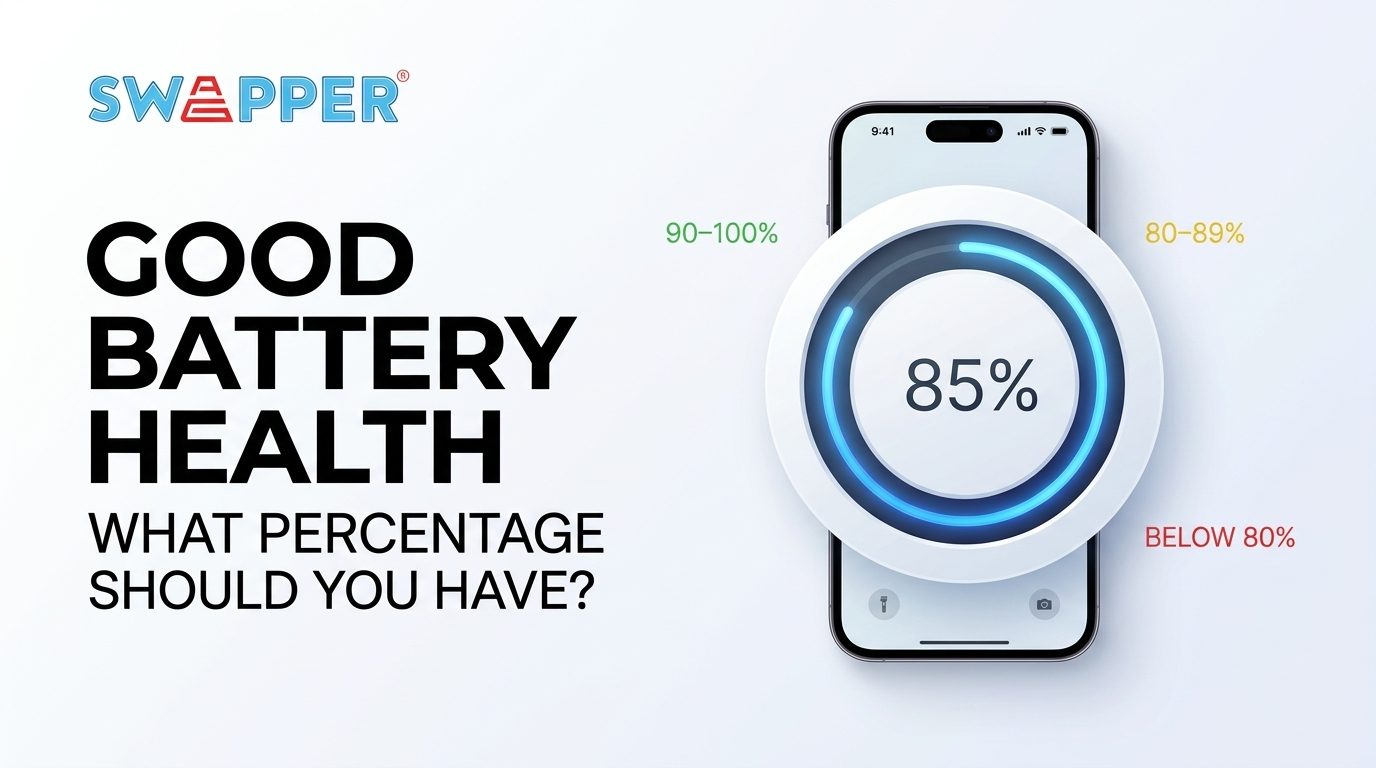
Wondering whether your phone battery is still in good condition? Understanding your good smartphone battery health percentage can help you decide whether to keep using your device or consider a battery replacement.
Battery health measures how much charge your battery can hold compared with when it was new. Over time, normal battery ageing reduces its capacity, meaning your phone may need charging more frequently.
Your smartphone battery health percentage indicates how much charge your battery can hold compared with when it was new. Use this visual guide to understand what your battery health reading may mean.
The battery is reporting its full estimated original capacity. This is typical of a new battery, although actual runtime also depends on usage and device settings.
Generally a good reading. Some capacity loss is normal as your smartphone battery ages, and everyday performance may remain satisfactory.
Your battery has lost some of its original estimated capacity. Consider its runtime and your phone manufacturer's guidance when deciding whether to arrange a battery assessment.
Battery life may be noticeably shorter. If you also experience rapid drain, unexpected shutdowns or a service warning, consider having the battery checked by a qualified technician.
Tip: On iPhone, look under Settings > Battery > Battery Health or Battery Health & Charging. On Android, check your phone's battery settings or manufacturer's diagnostic tools.
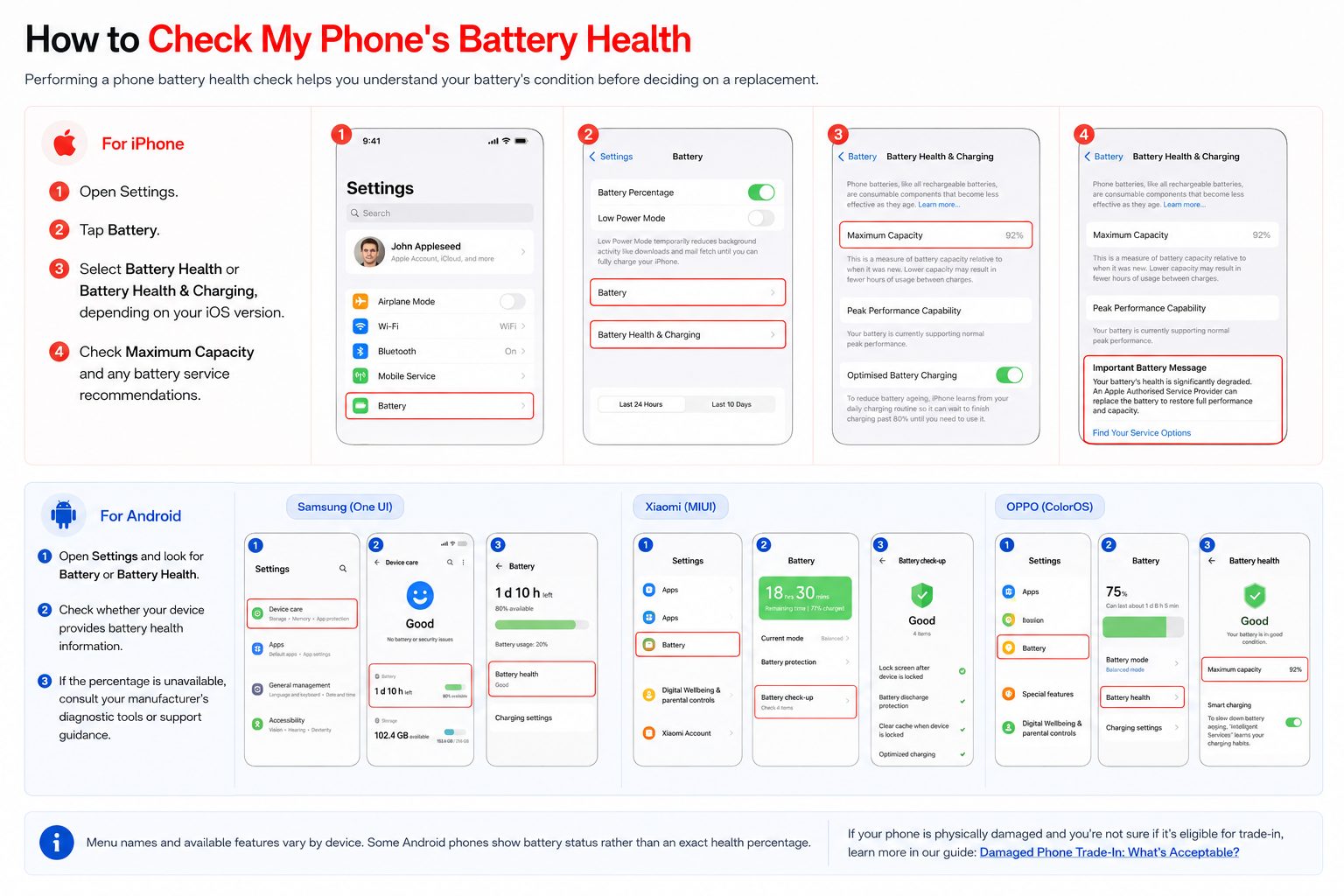
Performing a phone battery health check helps you understand your battery's condition before deciding on a replacement. Follow the steps below for your device.
iPhone provides a built-in battery health menu on supported models and iOS versions.
Open Settings on your iPhone.
Tap Battery.
Select Battery Health or Battery Health & Charging, depending on your iOS version.
Check Maximum Capacity and look for any battery service recommendations.
Battery health menus vary between manufacturers. Start with your device's settings.
Open Settings and look for Battery or Battery Health.
Check whether your phone displays battery health, battery status or maximum capacity.
If no health percentage is available, consult your manufacturer's diagnostic tools or support guidance.
Look under Settings → Battery or Device Care. Samsung Members diagnostics may provide battery status.
Check Battery settings and available battery information. Options vary by model and software version.
Look in Battery settings for a Battery Health option if supported by your device.
A low battery health percentage does not automatically mean you need a new battery. Your phone's real-world performance and any battery warnings can also help determine whether a professional assessment is appropriate.
Consider a professional battery assessment if your phone experiences rapid battery drain, unexpected shutdowns, noticeably reduced runtime or a battery service warning.
These symptoms can indicate that your battery has degraded significantly, although other hardware or software issues can sometimes cause similar problems.
Before arranging phone battery replacement, check your warranty, available service options and the expected replacement cost. iPhone battery cost varies by model, location and service provider, so check the manufacturer's current service information for an accurate estimate.
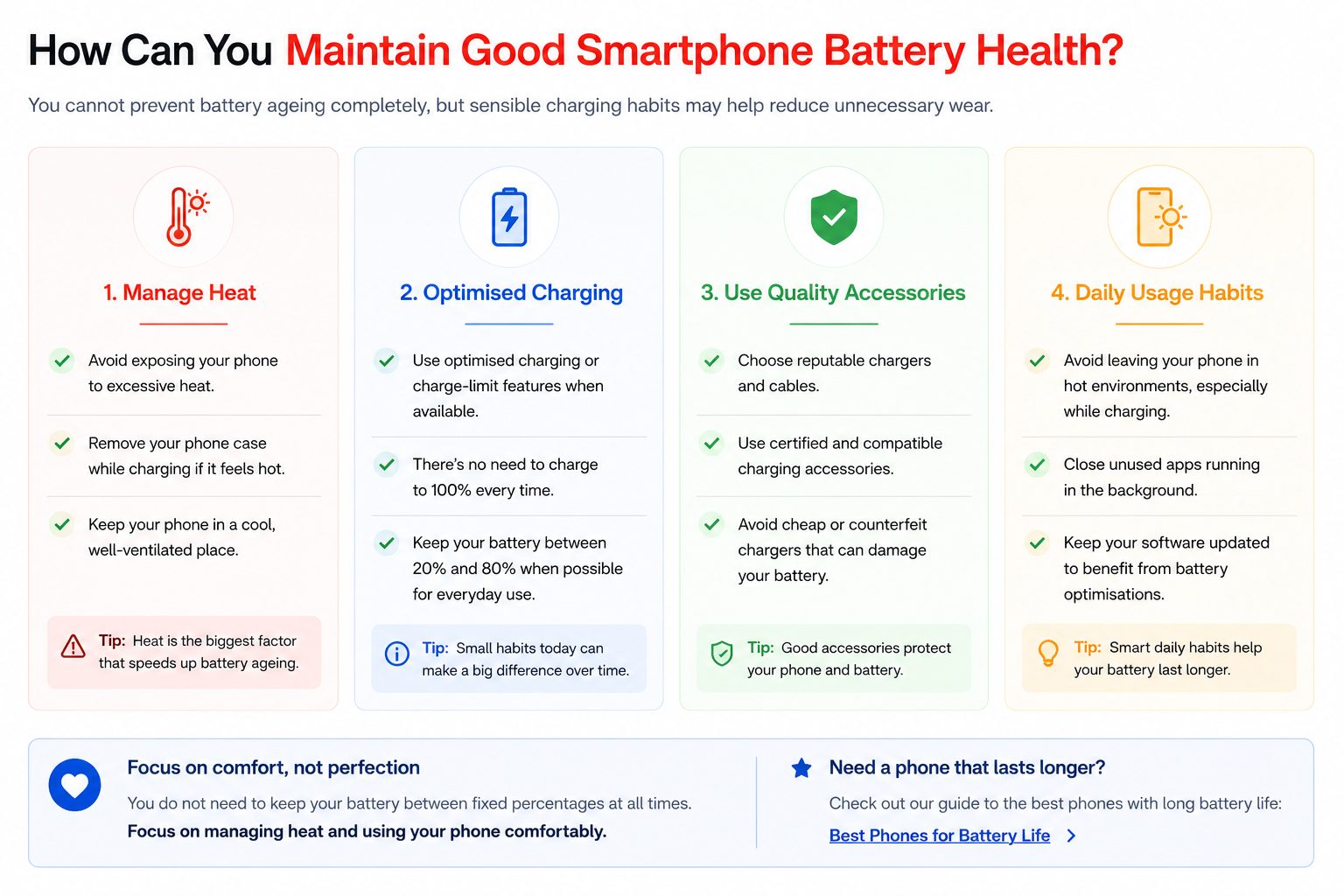
You cannot prevent battery ageing completely, but sensible charging habits may help reduce unnecessary wear. Follow these practical tips to take better care of your smartphone battery.
You do not need to keep your battery between fixed percentages at all times. Focus on managing heat, using available charging features and using your phone comfortably.
Have questions about smartphone battery health? Find answers to common questions about battery percentages, charging habits and when to consider a replacement.
Generally, yes. An 85% battery health reading indicates that the battery's estimated maximum capacity is lower than when it was new, but it may still perform adequately. Consider your phone's daily runtime, performance and any battery service warnings when assessing its condition.
Not necessarily. An 80% reading can be a useful reference point, but it is not a universal replacement rule. Consider the manufacturer's recommendations, battery runtime, unexpected shutdowns and other symptoms before deciding whether to replace your battery.
Charging to 100% is normal and does not automatically damage your phone battery. However, spending extended periods at a high charge level, particularly in hot conditions, can contribute to battery ageing. Optimised charging and charge limit features may help reduce this effect when available.
Knowing what constitutes good smartphone battery health helps you make informed decisions about battery maintenance and replacement. Check your device's battery information, monitor real-world performance and compare repair costs before buying a replacement battery.